
WEDDING & EVENT PHOTO SHARING WITH A QR CODE.
Your people.
Their perspective.
All your memories.
The little details. The unexpected hugs. The family photo with everyone finally dressed up. Collect wedding and event photos and videos from your guests with one QR code, and bring them together in your private album. Choose your favourites together, share your picks, and take them into your next creation.
No guest accounts. No app downloads.
Just a QR code and the people who make it special.
you’ll want to keep.
people.
everyone, together.
RIGHT
HERE.
seen through their eyes. ♡
SHARE.
KEEP.
BECAUSE YOU CAN’T BE EVERYWHERE AT ONCE.
You lived the moment.
Now see what everyone else saw.
The flowers you chose. The socks he insisted on wearing.
The friends laughing in the corner.
Some of the best parts of your event are waiting in someone else’s camera roll.
A CLEAR LOOK AT WHAT YOU GET
Is SF Memories right for your event?
SF Memories is a browser-based photo and video collection service by Special Forces Marketing in Edmonton, Canada. It suits weddings, company parties, birthdays, team celebrations and family gatherings where the organizer wants a private collection of guests’ memories.
Collect without guest accounts.
Guests scan your event QR code or open its link to upload photos and videos. The organizer pays once; guests contribute free. Each event includes 50 GB and up to 5,000 files, subject to both limits.
Choose favourites together.
Invite someone by email to help choose on their own device. Collaborators sign in, keep personal favourites and edit shared picks of up to 10 photos. Refresh to see changes; originals stay in the album.
Take your picks into AI.
Download the selected-photo pack and attach it in your own ChatGPT account for captions, collage ideas or social content. This is an optional file handoff, not a direct AI integration or automatic video editor.
Price: C$49 plus tax for the first 25 paid events; C$59 regular price. Uploads open 24 hours before the event, and album access ends 90 days after it. Download your originals before that deadline—Memories is not permanent storage.
Try the sample album and photo-pack workflow → · Make a free printable QR sign → · Get Memories →
The sign maker and sample demo are free with no signup. A live event album is a separate paid service. The demo uses illustrative sample photos, not a customer event.
ONE QR CODE. SO MANY PERSPECTIVES.
How QR code photo sharing works.
Make it yours.
Create your event and get its QR code. Put it on tables, signs, or wherever your guests will see it.
Let everyone join in.
Guests scan and upload photos and videos from their phones. No app or account needed.
Take the memories home.
Open your album, invite someone to choose favourites with you, and download the memories you want to keep.
Simple is easier to show.
Open the guest preview and explore how sharing works.
NEW · FAVOURITES, SHARING & A LITTLE MORE POSSIBILITY
The morning after.
The next thing you make.
Coffee in hand. Your favourite person beside you. All those moments you missed, ready to discover together.
Invite friends or family to help choose, each on their own phone. Keep your own favourites, then bring up to 10 photos into one shared selection. Share them with your people—or take them into ChatGPT to create something special.
A second look at the good times.
Invite people by email to help pick. Each person signs in, keeps their own favourites, and can contribute to your shared picks. Refresh to see their latest choices.
Just the moments you choose.
Create a link to your selected photos. Anyone with that link can view and download those copies; the rest of your album stays private. Choose when the link expires, or turn it off.
Bring your favourites into chat.
Download your selected photo pack, attach it in ChatGPT, and use the included instructions to ask for a collage, a caption, or ideas for your next social post.
A LITTLE INSPIRATION · WEDDING PHOTO EXAMPLE
From favourite photos.
To your next post.
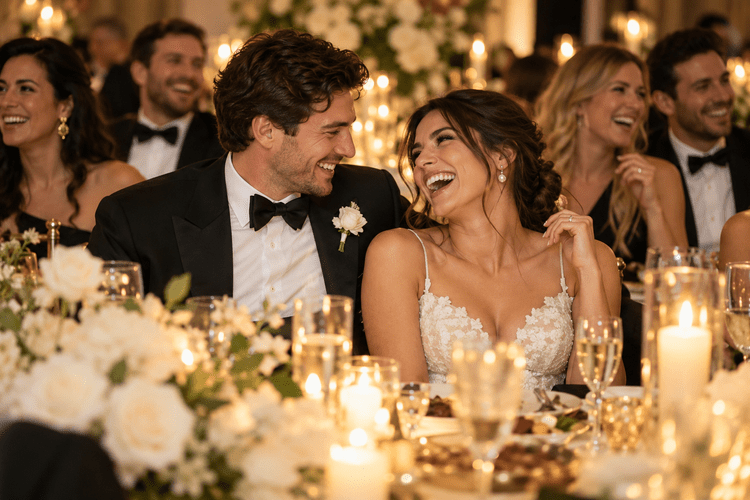
Imagine these are three moments you and your partner chose from your guests’ uploads. Here’s how those favourites could become something you share.
Try it yourself — choose your favourites ↗
A free sample album. Pick photos, download a pack, and try the creative workflow. No signup needed.
YOUR SHARED PICKS


DOWNLOAD YOUR PHOTO PACK → ATTACH IT IN CHATGPT
Try asking:
“Use these three photos to create an elegant wedding recap collage for Instagram. Keep the original photos unchanged. Use warm cream and gold, with the words ‘Our day, through your eyes.’ Write a short thank-you caption for our guests, too.”
ONE POSSIBLE CREATIVE DIRECTION
Caption idea: “We lived the day. You captured the little things. Thank you for giving us so many more moments to love. ♡”
Illustrative layout by SF Marketing using AI-generated wedding images—not a customer event or a guaranteed AI result. Choose your own photos in Memories, then download and attach the selected photo pack in your own ChatGPT account. Creative tools and results vary; nothing is sent to AI automatically.
Already have an event? Open your album and choose “Choose favourites together.”
Open your album ↗Creating with AI is optional and happens in your own ChatGPT account. Available tools and results vary. Download and attach the photo pack; a share link alone is not a reliable substitute. Memories does not automatically send your album to an AI service.
MADE FOR YOUR KIND OF SPECIAL.
Whatever brings
your people together.
A LITTLE LAUNCH CELEBRATION.
One event.
One payment.
So much to look back on.
The organizer pays once.
Guests contribute for free.
Available for billing addresses in Alberta, British Columbia, Ontario, Quebec, New Brunswick, Nova Scotia, Prince Edward Island, Newfoundland and Labrador, Yukon, Northwest Territories, and Nunavut. Saskatchewan and Manitoba are not yet available. Confirm eligibility and your final price at checkout.
Launch price · Regular price C$59
Plus applicable tax.
- Your event’s shareable QR code
- 50 GB of storage · up to 5,000 files
- Guest photo and video uploads
- Album access through 90 days after your event
- Private owner access to your album
- Download your memories to keep
- Invite people to choose favourites together
- Selected-photo share links & downloadable photo packs
Free promotional events do not count toward the 25.
IT STARTED WITH A FRIEND’S WEDDING.
Something simple.
Something special.
A friend asked Josh for an easier way to collect photos from his wedding guests. That request brought back a familiar idea: disposable cameras on tables, and all the brilliant, silly moments waiting to be discovered afterward.
Today, everyone has a camera in their pocket. Memories gives those moments a place to come together.
Created with care by Josh Stegman & Sherry Adamowski in Edmonton.A product of Special Forces Marketing.
A FEW THINGS YOU MIGHT BE WONDERING.
Your event photo-sharing questions.
How much storage is included?
Each event includes 50 GB of storage and up to 5,000 files, subject to both limits. Individual photos can be up to 50 MB and videos up to 2 GB.
How long can guests upload, and when should I download?
Standard event uploads open 24 hours before your event for testing. Guests can keep contributing until your album expires, with uploads and downloads available through the 90th day after the event. Check your event confirmation for the exact deadline, and download your collection before access ends. Memories is temporary event storage, not a permanent archive.
Can I download the original files together?
Yes. Original files are available to download. Larger collections are organized into numbered ZIP parts, and files too large for a ZIP part are downloaded individually. Save every part you want to keep before your album expires.
How do I collect photos from wedding guests with a QR code?
Create a Memories event, place its QR code on your tables or welcome sign, and invite guests to scan and upload. Their photos and videos arrive in your private owner album, ready for you to view and download.
Can guests share photos they already took?
Yes. Guests can choose photos and videos from their phones, including the family portraits, candid moments, and little details they captured during your event.
Where should I put my event QR code?
Place it where guests have a moment to scan: reception tables, the welcome area, or near the guest book. Add a short invitation such as “Share the day through your eyes,” and test the printed code on a phone before your event.
Do guests need an app or an account?
No. Guests use the event QR code or link to open the upload page in their browser.
Can I download the photos and videos?
Yes. Use your private owner access to view your collection and download the memories you want to keep.
Who gets to see the album?
Your QR code lets guests contribute. You manage the album through private owner access. You can invite people by email to view photo previews and help choose favourites; they cannot delete originals or manage your event. A selected-photo share link gives anyone who has it access to those selected copies only.
Can we choose our favourite photos together?
Yes. Invite friends or family by email. Each person signs in with their own email, keeps their own favourites, and can edit a shared selection of up to 10 photos. Refresh to see other people’s latest choices. Choosing favourites does not delete the originals.
How do I use my Memories photos with ChatGPT?
Create a share link for your selected photos, open it, and download the photo pack. Attach that file in a ChatGPT conversation and paste the included instructions. You can ask for a collage made from the supplied photos, a caption, or social-post ideas. This is a file-upload workflow, not a direct ChatGPT integration. Results depend on the tools available in your account; review the output before posting.
What is included in a selected photo pack?
Up to 10 selected photos, exported as smaller JPEG copies with embedded metadata removed, plus instructions for using them in ChatGPT. Photos up to 25 MB are eligible for selection in this version. Videos and larger photos remain in your main album, where you can download the originals.
Can I turn off a photo-sharing link?
Yes. Choose a link lifetime of 1, 2, or 7 days, within your album’s access period, or turn it off sooner. Anyone with the link can view and download its selected photos while it is active. Turning it off cannot remove copies already saved. A link keeps the selection it was created with; create a new link if you change your picks.
Is Memories only for weddings?
No. Use it for company parties, birthdays, team celebrations, reunions, and other gatherings where people take photos together.
How does the launch price work?
The first 25 paid events are C$49 each, plus applicable tax. After that, the regular price is C$59. Free promotional events do not count toward the first 25.
A LITTLE HELP WITH THE PLANNING
Bring the photos
into your wedding plans.
Explore wedding photo sharing with Memories, or follow our practical guide to collecting photos from wedding guests—with QR placement ideas, table-card wording, and a checklist for the day.
Make a free wedding photo QR sign ↗ — choose a design, add your guest-upload link, and download it for your tables. No signup required.
BIG DAYS. LITTLE MOMENTS.
Give those pictures
somewhere to come together.
Create your event ↗